

 Auto Mail Sender™ Standard Edition
 Auto Mail Sender™ Birthday Edition
 Auto Mail Sender™ File Edition
 Email Checker Pro
 TSSI .NET SMTP Component
 PDF to X
 PDF to DOC
 PDF to JPG
 PDF to Text
 PDF to HTML

 * Monitor Computer/Phone
 PC WorkBreak
 * Alfa eBooks Manager
 * Plagiarism Detector
 KeyMusic
 Advanced Date Time Calculator

 WinExt®
 * Files / Directories Recovery
 WinExt® Key Launcher
 WinExt® Batch Operator
 Windows Explorer Tracker
 Duplicate File Finder Plus
 Duplicate Photo Finder Plus
 1Tree Pro
 Duplicate MP3 Finder Plus
 Advanced Recent Access
 tail for Windows

 * Say Goodbye to Ads
 * Download Online Video
 * Free Remote Desktop

 * Full Range Design Software
 * Posters & CD/DVD Covers

 Access Password Recovery

 * Visual Graph ActiveX Component
 Easy Work Time Calculator
 Date Time Counter
 WinExt® Privacy Protector
 WinExt® Registry Fixer
 WinExt® System Cleaner
 WinExt® System Optimizer
 WinExt® Bulk Renamer
 File & Folder Lister
 VB 6 Pure Code Lines Calculator
 .NET WYSIWYG HTML Editor
 Process Guard for Developer
I’m a freelancer; I work at home with my computer. It’s a trend for people nowadays. With a computer and a cell phone, you can finish you job at home and you can connect with you colleague at any time. But there is a problem for people like me. Because we were working at home alone, we always forget to rest when we totally put ourselves in our work. So, we need a timetracker. I recognize it is important to calculate my hours , and make rest and work combined in harmony. So I found a good one in TriSun software, it’s well fitted for easy time tracking.
Now ,I can show you how I use this timetracker to manage my work effectively. At the beginning of my day, I create a new item morning job. And the sw began to record my work time. Maybe a few hours later, I want to check my work time, I can turn the interfere on to calculate my hours. Then, I think I need a break, so I can click the pause button to stop time recording.
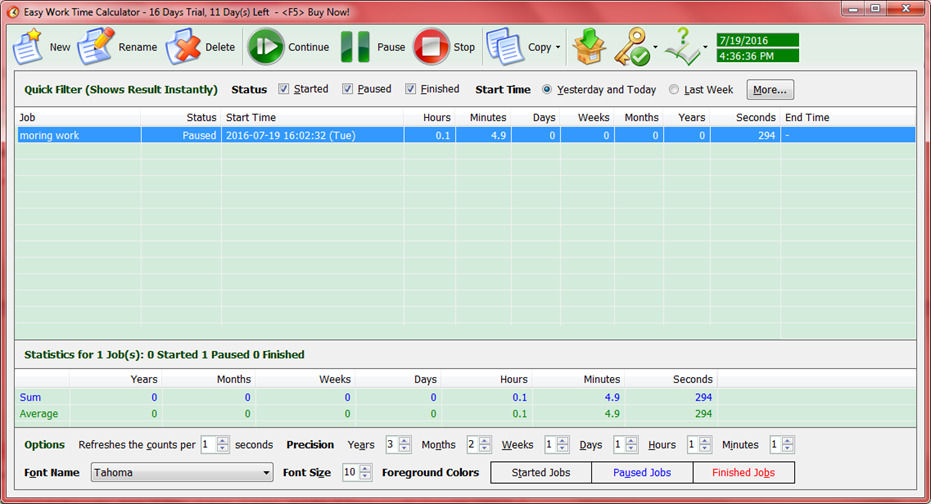
And add an item like resting, than, I go to have a rest. It’s also recording my resting time. The next time I sit before my computer, I can click pause button to stop recording my resting time. It’s not only suit for easy time tracking, it also suit for students, house wife, and other people who need calculate the working hours.
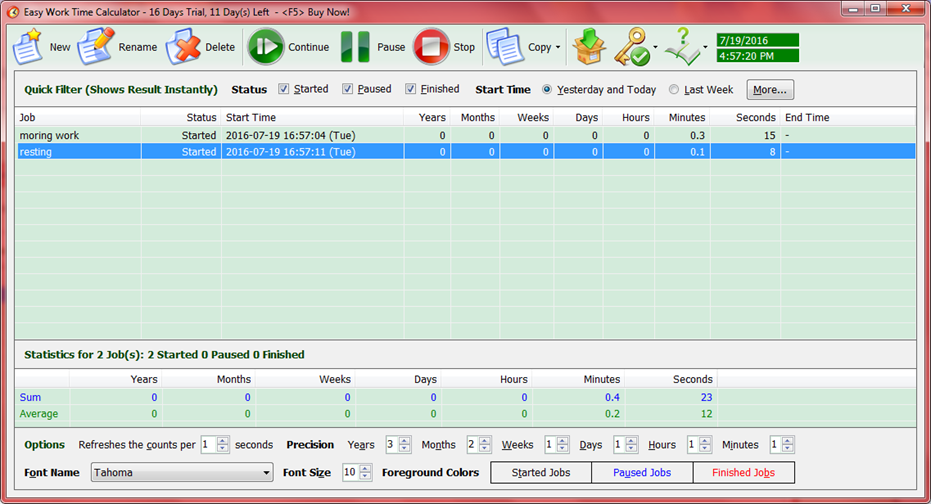
And choose the “morning working ” to click continue. Then it would continue to record my working hours. At the end of the day, I can have a sheet to check how many time I spent on my work and rest. It so continent, you can get this work hours calculator by below button.
 Download This Easy Time Tracking Tool
Now ,I can show you how I use this timetracker to manage my work effectively. At the beginning of my day, I create a new item morning job. And the sw began to record my work time. Maybe a few hours later, I want to check my work time, I can turn the interfere on to calculate my hours. Then, I think I need a break, so I can click the pause button to stop time recording.
And add an item like resting, than, I go to have a rest. It’s also recording my resting time. The next time I sit before my computer, I can click pause button to stop recording my resting time. It’s not only suit for easy time tracking, it also suit for students, house wife, and other people who need calculate the working hours.
And choose the “morning working ” to click continue. Then it would continue to record my working hours. At the end of the day, I can have a sheet to check how many time I spent on my work and rest. It so continent, you can get this work hours calculator by below button.
Download This Easy Time Tracking Tool
See Also
- How to hide columns in our time tracking application - date time counter?
- The Difference between Our 2 Time Calculators
- How to separately save records in our event timer?
- Useful Freelance Time Tracking Software to Calculate Work Hours for You
- How to Quickly Find My Job Recording on the Hours Worked Calculator
- Use the Best Time Tracking Software to Quick Copy the Time
- Use Time Duration Calculation to Calculate Number of Days by a Year Number with Decimal Place
- 5 Calculators for Time in Advanced Date Time Calculator
- 6 Reasons for Why I Choose Easy Work Time Calculator to Calculate Working Hours
- How to copy out the result of our calculating weeks between two dates tool?
- How to quickly change the conditions in our datetime calculator?
- How to subtract two dates? Use add and subtract time calculator!
- How to calculate months between two dates?
- How to count the number of days between two dates?
- Time Calculator Software Tool Free Download for Windows
- Days Between Dates Calculator Software Free Download for Windows
- Work Hours Calculator Software Tool Free Download for Windows